Compare WheelDash platforms
WheelDash has three implementations. Start with the watch you own, then choose the experience that matches how you record, navigate and review rides. Features are not identical across platforms.
Which one?
- Amazfit watch: the Amazfit app. It has the most features: custom dashboards, wheel presets, navigation and the Ride Portal. It installs from a QR code in the Zepp app, in about two minutes: see install.
- Garmin watch, WheelDash on the full screen: the Garmin App. Faster updates, wheel controls, and rides saved to Garmin Connect.
- Garmin watch, inside a Garmin activity: the Garmin Datafield. You keep Garmin’s maps and navigation; WheelDash adds the wheel data, refreshed once per second.
Both Garmin versions are free, so you can install both and try them, one ride at a time.
Garmin App
Standalone watch app
Open WheelDash directly from the Garmin app list. The watch connects to the EUC, decodes its data, manages alerts and records the ride.
Install Garmin AppGarmin Datafield
Inside a Garmin activity
Add WheelDash to a Garmin activity screen. The Datafield connects directly to the EUC while the Garmin activity handles recording, maps and navigation.
Find Garmin Datafield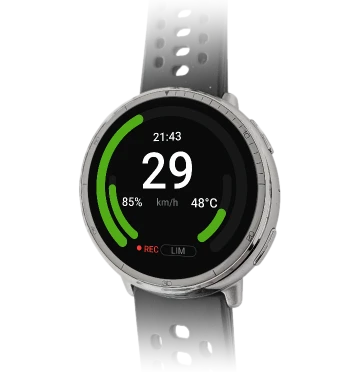
Amazfit
Standalone app, most features
Open WheelDash from the watch's app list. The watch connects to the EUC, shows the dashboard you build, runs the alarms and records the ride, which you can upload to the Ride Portal afterwards.
Install on AmazfitDetailed comparison
| Capability | Garmin App | Garmin Datafield | Amazfit |
|---|---|---|---|
| Supported EUCs | Begode, Extreme Bull, Leaperkim, NOSFET, KingSong, InMotion (limited)InMotion only from the V11 (V11, V11Y, V12, V13, V14), and not every reading can be shown. NOSFET support is untested. | Begode, Extreme Bull, Leaperkim, NOSFET, KingSongNo InMotion support. | Begode, Extreme Bull, Leaperkim, NOSFET, KingSong, InMotionMost InMotion models, from the V5 to the V14, P6 and E20. |
| Live EUC telemetry | Available | Direct BLECurrent wheel choices are Begode/Gotway, Leaperkim/NOSFET and KingSong. Like all Garmin datafields, it refreshes once per second. | Available |
| Safety alerts | Available | Visual warnings | Available |
| Audible and vibration alerts | Watch tones + vibrationExact alert output depends on watch capabilities. | Watch tones + vibrationExact alert output depends on watch capabilities. | Watch sounds + vibration |
| ENGO integration | Available | Telemetry + navigation cuesCan send EUC data and compatible Garmin activity navigation cues to ENGO glasses. | Available |
| Garmin Varia integration | Available | Available | Available |
| Offline map display | Not available | Garmin's own mapsOn watches with Garmin maps, the host activity's map screens sit beside the WheelDash screen. | Preloaded on the watchRoute and raster map data are transferred through the phone before the ride. |
| Navigation | Not availableThe standalone Garmin App focuses on telemetry, alerts and recording; it does not include a map or navigation view. | Garmin's own navigationNavigation is Garmin's native navigation in the host activity. WheelDash can forward compatible turn and destination fields to ENGO glasses. | Europe, USA, Canada, European Russia and ChinaWheelDash's own navigation, running in the app on the watch. Open to every WheelDash account. |
| Ride recording | Garmin Connect | Garmin activity + EUC FIT fieldsThe host activity records the ride; WheelDash contributes EUC record and session fields to the FIT file. | On-watch recording |
| WheelDash Ride Portal | Not used for Garmin rides | Not used for Garmin rides | Upload through phone |
| Dashboard customization | Set layout + 4/6/8 fieldsChoose the centre value and the top arc on the main screen. The datafield-like view shows 4, 6 or 8 fields you pick. | 6 or 8 configurable fieldsChoose the displayed metrics within the Datafield's fixed layout. | Custom layouts |
| Wheel presets | Not available | Not available | Up to 4 per wheelSwitch wheel settings such as tiltback speed or pedal mode with a watch button. Available settings depend on the wheel. |
| Account needed | None | None | Only to upload rides or navigateFree WheelDash account, also used for cloud backup of settings. |
| Watch battery | 10 h+ on many watchesDepends on the watch model. | 10 h+ on many watchesThe lightest version. Depends on the watch model. | About 12 % per hour (Bip 6)Measured on a Bip 6: a 1 h 40 ride with ENGO glasses and a Varia radar used 20 % of the battery. |
| Languages | English | English | 6 languagesEnglish, French, German, Spanish, Russian and Simplified Chinese. |
Maps and navigation
Each platform handles maps differently:
- Garmin App: no map and no navigation. It focuses on telemetry, alerts and recording.
- Garmin Datafield: runs inside a Garmin activity, so you keep Garmin’s own maps and navigation on watches that have them. WheelDash can forward compatible turn information to ENGO glasses. Like all Garmin datafields, it refreshes once per second.
- Amazfit: WheelDash’s own navigation, running in the app. You upload a GPX route to the Ride Portal, send it to the watch with its map tiles before the ride, and follow it on the watch. It is available in Europe, the Canary Islands, the USA, Canada, European Russia, and China and is open to every Ride Portal account. See the navigation guide.
What “phone-free” means
In direct EUC mode, the watch makes the Bluetooth connection, decodes the wheel data, updates the dashboard and evaluates alarms. Recording also stays on the watch: the standalone applications manage their own sessions, while the Garmin Datafield contributes EUC fields to the host Garmin activity. A phone is not the live-data middleman while riding.
A phone can still be part of setup and transfer workflows. On Amazfit, the Zepp phone app is used for installation and settings, to transfer routes before a ride, and to upload a recording afterwards. The optional EUC World mode also receives data through the phone instead of connecting the watch directly to the EUC.
Compatibility
EUCs
WheelDash currently supports EUCs from these manufacturers:
-
Begode / Gotway
-
Extreme Bull
-
Leaperkim
-
NOSFET
-
KingSong
-
InMotion
Supported models and telemetry fields vary by implementation, wheel protocol and firmware:
- The Garmin Datafield offers Begode/Gotway/Extreme Bull, Leaperkim/NOSFET and KingSong.
- InMotion on the Garmin App is partial. It works with recent models only, from the V11 (V11, V11Y, V12, V13 and V14), and some readings are not available on Garmin. The Garmin Datafield does not support InMotion.
- InMotion on Amazfit is the most complete: the V9, V11/V11Y, V12, V13 and V14 families, plus the P6, V6, X1 and E20, and the older V5, V8 and V10 families.
Some InMotion models are experimental or have had only limited testing on real wheels.
If your EUC is not recognized, contact the developer with its brand, model and firmware.
Garmin watches
The Garmin App installs on 90 watches and bike computers, and the Garmin Datafield on 50. Connect IQ only offers WheelDash for the watches it supports.
Garmin App: supported watches
- fēnix
- fēnix 5 Plus · fēnix 5S Plus · fēnix 5X Plus · fēnix 6 / 6 Solar / 6 Dual Power · fēnix 6 Pro / 6 Sapphire / 6 Pro Solar / 6 Pro Dual Power / quatix 6 · fēnix 6S / 6S Solar / 6S Dual Power · fēnix 6X Pro / 6X Sapphire / 6X Pro Solar / tactix Delta Sapphire / Delta Solar / Delta Solar - Ballistics Edition / quatix 6X / 6X Solar / 6X Dual Power · fēnix 7 / quatix 7 · fēnix 7 Pro · fēnix 7 Pro - Solar Edition (no Wi-Fi) · fēnix 7S · fēnix 7S Pro · fēnix 7X / tactix 7 / quatix 7X Solar / Enduro 2 · fēnix 7X Pro · fēnix 7X Pro - Solar Edition (no Wi-Fi) · fēnix 8 43mm · fēnix 8 47mm / 51mm / tactix 8 47mm / 51mm / quatix 8 47mm / 51mm · fēnix 8 Pro 47mm / 51mm / MicroLED / quatix 8 Pro 47mm / 51mm · fēnix 8 Solar 47mm · fēnix 8 Solar 51mm / tactix 8 Solar 51mm · fēnix 9 43mm · fēnix 9 47mm / 51mm · fēnix 9 Pro 43mm · fēnix 9 Pro 47mm · fēnix 9 Pro 51mm · fēnix 9 Pro Solar 47mm · fēnix 9 Pro Solar 51mm · fēnix E
- epix
- epix (Gen 2) / quatix 7 Sapphire · epix Pro (Gen 2) 42mm · epix Pro (Gen 2) 47mm / quatix 7 Pro · epix Pro (Gen 2) 51mm / D2 Mach 1 Pro / tactix 7 – AMOLED Edition
- Forerunner
- Forerunner 245 · Forerunner 245 Music · Forerunner 255 · Forerunner 255 Music · Forerunner 265 · Forerunner 745 · Forerunner 945 · Forerunner 945 LTE · Forerunner 955 / Solar · Forerunner 965 · Forerunner 970
- Venu
- Venu · Venu 2 · Venu 2 Plus · Venu 3 · Venu 3S · Venu 4 41mm · Venu 4 45mm / D2 Air X15 · Venu Mercedes-Benz Collection
- vívoactive
- vívoactive 3 Music · vívoactive 3 Music LTE · vívoactive 4 · vívoactive 4S · vívoactive 5 · vívoactive 6
- Instinct
- Instinct 2 / Solar / Dual Power / dēzl Edition · Instinct 2X Solar · Instinct 3 Solar 45mm / 50mm · Instinct Crossover · Instinct E 45mm
- Enduro
- Enduro · Enduro 3
- MARQ
- MARQ (Gen 2) Athlete / Adventurer / Captain / Golfer / Carbon Edition / Commander - Carbon Edition · MARQ (Gen 2) Aviator · MARQ Adventurer · MARQ Athlete · MARQ Aviator · MARQ Captain / MARQ Captain: American Magic Edition · MARQ Commander · MARQ Driver · MARQ Expedition · MARQ Golfer
- Descent
- Descent G1 / G1 Solar · Descent Mk2 / Mk2i · Descent Mk2 S · Descent Mk3 43mm / Mk3i 43mm · Descent Mk3i 51mm
- D2
- D2 Air · D2 Air X10 · D2 Mach 1
- Approach
- Approach S70 42mm · Approach S70 47mm
- Edge
- Edge 1040 / 1040 Solar · Edge 1050 · Edge Explore · Edge Explore 2
- Legacy series
- Darth Vader · First Avenger
Garmin Datafield: supported watches
- fēnix
- fēnix 5 Plus · fēnix 5S Plus · fēnix 5X Plus · fēnix 6 Pro / 6 Sapphire / 6 Pro Solar / 6 Pro Dual Power / quatix 6 · fēnix 6S Pro / 6S Sapphire / 6S Pro Solar / 6S Pro Dual Power · fēnix 6X Pro / 6X Sapphire / 6X Pro Solar / tactix Delta Sapphire / Delta Solar / Delta Solar - Ballistics Edition / quatix 6X / 6X Solar / 6X Dual Power · fēnix 7 / quatix 7 · fēnix 7 Pro · fēnix 7 Pro - Solar Edition (no Wi-Fi) · fēnix 7S · fēnix 7S Pro · fēnix 7X / tactix 7 / quatix 7X Solar / Enduro 2 · fēnix 7X Pro · fēnix 7X Pro - Solar Edition (no Wi-Fi) · fēnix 8 43mm · fēnix 8 47mm / 51mm / tactix 8 47mm / 51mm / quatix 8 47mm / 51mm · fēnix 8 Solar 47mm · fēnix 8 Solar 51mm / tactix 8 Solar 51mm · fēnix 9 43mm · fēnix 9 47mm / 51mm · fēnix 9 Pro 43mm · fēnix 9 Pro 47mm · fēnix 9 Pro 51mm · fēnix 9 Pro Solar 47mm · fēnix 9 Pro Solar 51mm · fēnix E
- epix
- epix (Gen 2) / quatix 7 Sapphire · epix Pro (Gen 2) 42mm · epix Pro (Gen 2) 47mm / quatix 7 Pro · epix Pro (Gen 2) 51mm / D2 Mach 1 Pro / tactix 7 – AMOLED Edition
- Forerunner
- Forerunner 255 · Forerunner 255 Music · Forerunner 745 · Forerunner 945 · Forerunner 945 LTE · Forerunner 955 / Solar · Forerunner 965
- Venu
- Venu 2 · Venu 2 Plus · Venu 2S · Venu 3 · Venu 3S
- vívoactive
- vívoactive 5
- Enduro
- Enduro 3
- Descent
- Descent Mk2 / Mk2i · Descent Mk2 S
- Approach
- Approach S70 42mm · Approach S70 47mm
- Edge
- Edge 1040 / 1040 Solar · Edge 1050
From the Connect IQ store listings, October 2026.
Bluetooth responsiveness on Garmin can vary by watch model, firmware and how frequently the wheel sends data. Wheels with higher Bluetooth traffic may show more noticeable delay on some watches.
Amazfit watches
Current WheelDash packages are available for:
-
Active 2 NFC Round
-
Active 2 NFC Square
-
Active 2 Round
-
Active 2 Square
-
Active 3 Premium
-
Active Max
-
Balance 2
-
Balance 2 XT
-
Bip 6
-
Bip Max
-
Cheetah 2 Pro
-
Cheetah 2 Ultra
-
T-Rex 3
-
T-Rex 3 Pro 44 mm
-
T-Rex 3 Pro 48 mm
-
T-Rex Ultra 2
Experimental build for older watches
An API 3.6 / ZeppOS 3.5 build is also available for:
-
Active
-
Balance
-
Cheetah Pro
-
Cheetah Round
-
Cheetah Square
-
Falcon
-
GTR 4
-
GTS 4
-
T-Rex Ultra
This build has not been tested on real hardware, and some features may not work as intended. Packages are on the WheelDash Amazfit releases page.
Ready to install? Follow the setup guide for your platform.